
How to Apply for SSDJ Foundation Support: A Step-by-Step Guide

At the SSDJ Foundation, we believe a brilliant, motivated student should never have to give up on their education for want of money. If that sounds like you — or someone you know — this guide walks you through exactly how to apply for our support, what to keep ready, and what happens once you do.
Who we support
Our programme is built around the idea of a KABiL — a Keen, Ambitious, Bright, Identify, Learner: a talented student from an economically challenged family whose education is at risk for want of support. We select KABiLs in two ways:
- By merit at the gateway — brilliant learners identified on the basis of their CBSE Class 10 result.
- By need at any stage — any brilliant student facing financial distress at any point in their educational journey, in any field of study.
All assistance is paid directly to the institution — never as cash to the student or family — and, as long as you maintain good grades, the Foundation supports you for your entire course of study in India.
Are you eligible?
You are a strong candidate if:
- You have a clear goal and know the course you need to reach it.
- You scored 80% or above in your most recent qualifying examination.
- You come from a low socio-economic background and are willing to contribute a part of the course fee yourself.
Documents to keep handy
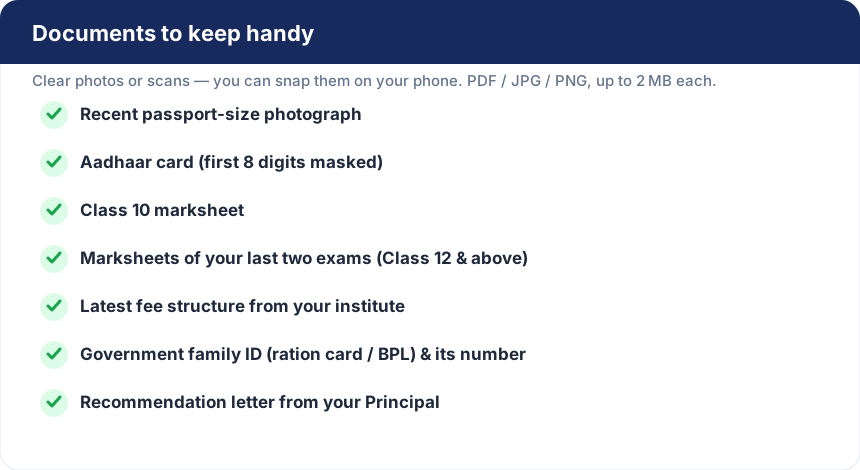
The online form takes about ten minutes. Before you begin, keep clear photos or scans of the following ready — you can take the photos straight from your phone. Blurry or unreadable files will be sent back for re-upload, so good light and a steady hand really help.
How to apply, step by step
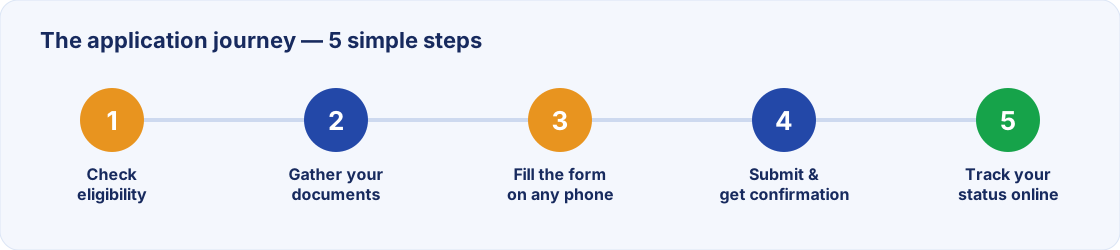
- Open the application form. Go to the Financial Assistance page and read the short eligibility and conditions panel.
- Fill in your details. The form has five simple sections — personal, family, course, documents and consent. Your progress is saved as you go, so you can pause and return later. (Your typed answers come back automatically on the same device; you will just need to re-attach any uploaded files.)
- Upload your documents. Add the files from your checklist. The form checks each photo for clarity and will gently warn you if one looks too blurry or dark.
- Submit. Review everything and submit. You will see your unique application number on screen right away.
What happens after you submit
You will receive a confirmation email with your application number and a link to create a password, so you can log in any time to follow your application's progress. From your account you can track the status, and if our team needs a clearer copy of any document, you will get a secure link to re-upload just that one file.
Our team then reviews your application. If your grant is approved, you will be assigned a KABiL ID and we will be in touch about the next steps — with the fees paid directly to your institution.
A few common questions
I forgot to set my password — how do I log in?
No problem. On the login page, choose “First time, or forgot your password?” and enter your mobile, email, application number or KABiL ID. We will email you a fresh link to set it.
My phone number has changed. Can I still log in?
Yes. You can log in with your email, application number or KABiL ID — not only your phone number.
Is the money given to me directly?
No. To keep things transparent and fair, all assistance is paid straight to your school or college, never as cash.
Can I apply again later?
Yes. If you have been supported before, simply log in and apply again — your details carry over and the new application is linked to your KABiL ID.
Education is the one gift that keeps on giving. If you are held back only by finances, we would be glad to walk alongside you.